

Running OpenClaw locally is not the same as running a simple chat model. Once you move into agentic workflows with tool calling, long system prompts, and multi-step reasoning, the hardware requirements shift in a very specific way. VRAM becomes the primary constraint, memory bandwidth defines responsiveness, and model size directly affects reliability.
This article focuses on GPU choices for OpenClaw in a desktop setup, but the same principles apply to laptops, mini PCs, and even AHT style server builds. The difference is simply how much VRAM and bandwidth you can realistically deploy.
OpenClaw Hardware Requirements and Model Reality
OpenClaw workloads are heavy on context. A typical run includes system files like AGENTS.md, IDENTITY.md, and SOUL.md. In practice, even simple tasks can push 30K to 40K tokens before the model starts generating.
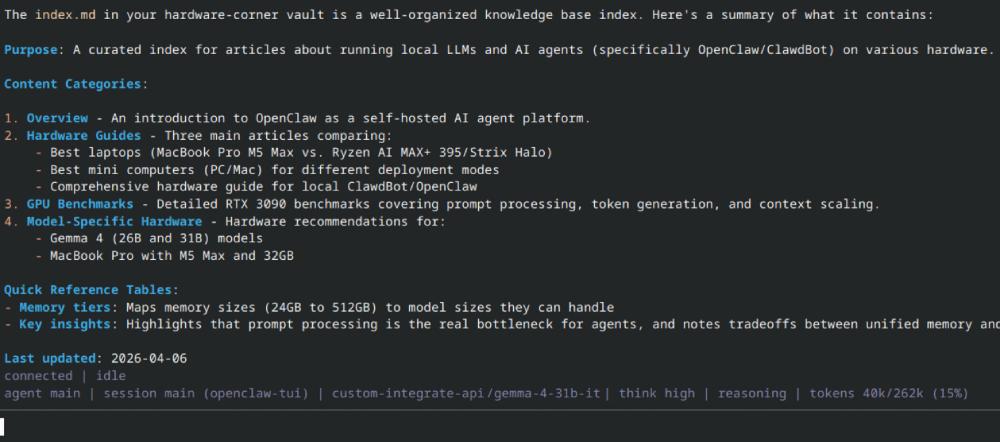
OpenClaw terminal UI showing a simple file-read task, where system prompts and agent context push total usage to around 40K tokens.
That changes the baseline. Small models are not enough.
Right now, the practical minimum for stable agentic use is:
- Qwen3.5 27B
- Gemma4 26B
These models work at 4-bit, but quality improves noticeably at 8-bit. This matters for tool use. At 4-bit, tool calling works, but you will see mistakes. At 8-bit, the model is more consistent in structured outputs and decision steps.
Model size also matters more than usual. Larger models handle planning and multi-step execution better. This is especially visible when the agent has to navigate files or chain multiple tools.
24GB GPUs: Entry Point for OpenClaw
The baseline for OpenClaw on desktop is a 24GB GPU. The two main options are the NVIDIA RTX 3090 and NVIDIA RTX 4090.
The RTX 3090 comes with 24GB GDDR6X and around 936 GB/s memory bandwidth. It is widely available on the second-hand market and remains the best price to performance entry point.
The RTX 4090 also has 24GB VRAM but increases bandwidth to over 1 TB/s and significantly improves compute throughput. It is faster, but the price jump is not always justified for budget builds.
RTX 3090 Benchmarks with OpenClaw
Prompt processing performance:
Prompt Processing (tokens/s)
| Model | 32K Context | 64K Context | 128K Context | 256K Context |
|---|---|---|---|---|
| Gemma4 26B (Q4_K) | 2453.4 | 1765.1 | 1147.1 | 671.4 |
| Qwen3.5 27B (Q4_K) | 848.2 | 678.9 | — | — |
| Qwen3.5 35B (MXFP4) | 2121.6 | 1749.8 | 1288.9 | — |
Token Generation (tokens/s)
| Model | 32K Context | 64K Context | 128K Context |
|---|---|---|---|
| Gemma4 26B (Q4_K) | 107.5 | 98.9 | 83.0 |
| Qwen3.5 27B (Q4_K) | 31.0 | 28.8 | — |
| Qwen3.5 35B (MXFP4) | 101.2 | 93.1 | 79.4 |
RTX 4090 Expected Performance with OpenClaw
Based on scaling data:
- 3090 is about 43 to 56 percent of 4090 depending on context size
- Expect roughly 1.8x speed improvement in real workloads
This mainly affects prompt processing. Token generation scales less aggressively.
24GB Practical Limits
24GB is enough to run all current 26B to 35B models at 4-bit, but there are tradeoffs.
Dense models like Gemma4 31B are better for agentic use but hit VRAM limits early. In practice, you get around 45K context before OOM. That is usable, but tight.
MoE models like Qwen3.5 35B offer much larger context windows, up to 128K, and run faster. However, they are slightly less reliable in structured agent tasks compared to dense models.
This creates a real constraint. You either choose:
- Better reasoning with limited context
- Larger context with slightly weaker planning
For OpenClaw, both options work, but neither is ideal.
32GB GPUs: The Practical Sweet Spot
The NVIDIA RTX 5090 is the first GPU where OpenClaw starts to feel unrestricted.
Prompt Processing (tokens/s)
| Model | 32K Context | 64K Context | 128K Context | 256K Context |
|---|---|---|---|---|
| Gemma4 26B (Q4_K) | 6292.6 | 4360.6 | 2839.1 | 1707.2 |
| Qwen3.5 27B (Q4_K) | 2341.8 | 1606.4 | 1019.8 | — |
| Qwen3.5 35B (MXFP4) | 5611.4 | 4624.5 | 3242.6 | 2003.7 |
Token Generation (tokens/s)
| Model | 32K Context | 64K Context | 128K Context |
|---|---|---|---|
| Gemma4 26B | 159.4 | 149.4 | 130.2 |
| Qwen3.5 27B | 53.8 | 50.1 | — |
| Qwen3.5 35B | 143.2 | 133.5 | 118.2 |
Why 32GB Matters
At 32GB VRAM, you can run dense 27B to 31B models with full 128K context. This removes the main bottleneck seen on 24GB cards.
This is important for OpenClaw because context is not optional. The system prompt alone can consume a large portion of available tokens.
Performance is also strong enough that both prompt processing and generation feel responsive.
The downside is price. The RTX 5090 is currently far above MSRP, often around 3600 USD. From a value perspective, it is hard to justify unless you need single GPU simplicity.
96GB GPUs: Full Local Agentic Capability
The NVIDIA RTX Pro 6000 Blackwell 96GB represents the high end for local OpenClaw setups.
This is where you can run large models like:
- Qwen3.5 122B Q4_K
- GPT-OSS 120B Q8 or MXFP4
Prompt processing example:
Prompt Processing (tokens/s)
| Model | 32K Context | 64K Context | 128K Context | 256K Context |
|---|---|---|---|---|
| Gemma4 26B (Q4_K) | 7107.6 | 5379.6 | 3667.8 | 2245.7 |
| Qwen3.5 27B (Q4_K) | 2526.7 | 1856.7 | 1404.9 | 903.1 |
| Gemma4 31B (Q4_K) | 2086.7 | 1423.0 | 876.8 | 506.8 |
| Qwen3.5 32B (Q4_K) | 1687.1 | 707.2 | 330.4 | — |
| gpt-oss 120B (MXFP4) | 3368.3 | 2360.3 | 1289.8 | — |
| Qwen3.5 122B (Q4_K) | 2582.9 | 2159.3 | 1548.0 | 1013.4 |
Token Generation (tokens/s)
| Model | 32K Context | 64K Context | 128K Context | 256K Context |
|---|---|---|---|---|
| Gemma4 26B (Q4_K) | 170.3 | 161.0 | 133.2 | 112.5 |
| Qwen3.5 27B (Q4_K) | 55.1 | 51.3 | 45.1 | 36.3 |
| Gemma4 31B (Q4_K) | 55.8 | 52.0 | 43.6 | 34.4 |
| Qwen3.5 32B (Q4_K) | 39.9 | 32.1 | 23.1 | — |
| gpt-oss 120B (MXFP4) | 161.5 | 133.1 | 99.8 | — |
| Qwen3.5 122B (Q4_K) | 91.3 | 86.6 | 78.1 | 65.6 |
Token generation remains usable even at this scale.
What You Gain at 96GB
At this level, most constraints disappear.
You can run:
- Large dense models with high quantization
- Full 128K to 256K context
- Stable tool calling with fewer failures
This is where OpenClaw starts behaving closer to hosted systems.
The limitation is cost. At around 8800 USD, this is not practical for most users.
Final Thoughts
For OpenClaw, GPU choice is mostly about model choice and the VRAM and context headroom that come with it.
24GB GPUs like the RTX 3090 are the minimum viable option. They work, but you will constantly manage tradeoffs between context and model quality.
32GB GPUs remove most practical limitations and offer a clean experience, but pricing is currently poor.
96GB GPUs unlock full agentic capability with large models and high quantization, but at a cost that only makes sense for dedicated setups.
If you are optimizing for value, a used RTX 3090 remains the best entry point. If you want fewer constraints and cleaner runs, 32GB is the real target. Beyond that, you are paying for scale, not necessity.