
Running large language models locally requires smart resource management. Quantization is the key technique that makes this possible by reducing memory requirements and improving inference speed. This practical guide focuses on what you need to know for local LLM deployment, not the mathematical theory[1] behind it.
For the technical mathematical details of quantization, check out Hugging Face’s comprehensive quantization guide.
What Quantization Means for Local LLMs
Quantization reduces model size by representing weights and activations with fewer bits. Instead of storing each parameter as a 32-bit floating point number, quantized models use 8-bit, 4-bit, or even 2-bit representations. This dramatically cuts VRAM requirements, increases the possible context length, and speeds up the inference on consumer hardware.
The practical impact is significant: a 7B parameter model that normally requires 28GB of VRAM can run in just 4GB when quantized to 4-bit precision[2]. This makes the difference between needing expensive server hardware and running models on a gaming GPU.
Popular Quantization Methods and Formats
Different quantization formats serve different hardware configurations and use cases. Each format represents a trade-off between model size, accuracy, and inference speed.
Most local LLMs are shared either as a file format or as weights compressed with a quantization method. GGUF is a true file format (.gguf) that packages the model and metadata into one file, usually with K-quants. By contrast, GPTQ, AWQ, and EXL2/EXL3 are quantization methods (algorithms) rather than formats – their compressed weights are stored in the standard Hugging Face structure using safetensors shards and config files. In practice, GGUF is both a format and a container for specific quants, while GPTQ, AWQ, and EXL models are methods that rely on safetensors for storage.
Table: LLM Quantization Formats and Methods Overview
This table summarizes the most commonly used quantization formats and methods for local large language model (LLM) inference.
| Name | Quantization Method | Quantization Levels | File Format | Type | Software |
|---|---|---|---|---|---|
| GGUF | llama.cpp’s internal methods | 1-8 bit mixed precision | .gguf | File format | llama.cpp, LM Studio, Ollama |
| GPTQ | GPTQ | 4-bit | Hugging Face safetensors | Method | ExLlamaV2, vLLM, AutoGPTQ |
| AWQ | AWQ | 4-bit | Hugging Face safetensors | Method | transformers; vLLM |
| EXL2 | EXL2 | 2–8 bit mixed precision | Hugging Face safetensors | Method | ExLlamaV2; text-generation-webui |
| EXL3 | EXL3 (QTIP variant) | 2–8 bit mixed precision | Hugging Face safetensors | Method | ExLlamaV2; text-generation-webui |
| MLX | MLX | 2–8 bit mixed precision | Hugging Face safetensors | Method | MLX Framework |
| BitsAndBytes | LLM.int8() / 4-bit NF4 or FP4 | 4-bit / 8-bit | Hugging Face safetensors | Method | transformers library, vLLM |
GGUF Format
GGUF is arguably the most convenient and popular format for running LLMs locally, especially for CPU inference and mixed CPU/GPU setups. Initially developed by @ggerganov (the developer of llama.cpp), its core advantage is simplicity: you download a single model file, and it works directly with popular software like llama.cppm LM Studio, Ollama, and others built on the same foundation. This “one file to run” approach avoids the more complex setup that other combinations of formats and software can require, such as managing specific Python dependencies and libraries.
Think of it as a versatile container that packages everything needed to run a model: the quantized model weights, information about the model’s architecture, and other essential metadata.
GGUF is a single file format that can contain weights quantized with many different schemas and bit levels. Legacy quants (like Q4_0, Q5_1, etc.); the modern “K-quants“, now the predominant choice, that uses a more sophisticated mixed-precision strategy for better quality at a given size; and the more advanced I-quants, which shift to vector quantization to achieve even better compression.
Common GGUF quantization levels (schemas) you will encounter include:
- Q2_K: The smallest, most compressed 2-bit version, useful for systems with very low memory.
- Q4_K_S, Q4_K_M, Q4_K_L: A range of popular 4-bit quants. Q4_K_M is often considered the best all-around balance of size, speed, and quality for most users.
- Q5_K_S, Q5_K_M, Q5_K_L: 5-bit versions that offer higher fidelity and less accuracy loss, at the cost of a slightly larger file size.
- Q8_0: An 8-bit quant with minimal quality loss, ideal for when you have enough VRAM and want performance that is very close to the original model.
Unsloth’s Dynamic Quants
While the K-quants mentioned above apply a consistent strategy across the model, a more advanced approach has emerged that treats different parts of the model with different levels of care.
Unsloth’s Dynamic Quantization is a technique that applies different quantization levels to each individual layer. Instead of using a uniform level like Q4_K_M for the entire model, this method analyzes which layers are most critical to the model’s performance. It then preserves those important layers at a higher precision while aggressively quantizing the less sensitive components.
The practical result: an Unsloth dynamic quant model (e.g., UD-Q4_K_XL) can demonstrate better performance and accuracy than a standard Q4_K_M model while maintaining similar size and memory footprint. This layer-wise optimization, calibrated on vast amounts of data, proves that an intelligent distribution of quantization can outperform uniform compression methods, giving you higher quality output for the same VRAM cost.
AWQ Quantization
Activation-aware Weight Quantization (AWQ) is a post-training method[3] that compresses large language models to smaller, faster, and less memory-intensive versions, typically using 4-bit integers. AWQ protects the most crucial weights from precision loss by analyzing activation patterns on a small dataset and applying scaling factors before quantization. This activation-aware approach often outperforms other techniques, especially for instruction-tuned models.
AWQ is a quantization method, not a file format. Its output integrates seamlessly with the Hugging Face ecosystem, with compressed weights stored in .safetensors or .bin files. The config.json file is updated with a quantization_config section containing metadata that guides the inference engine, allowing AWQ-quantized models to be loaded just like unquantized ones using compatible libraries.
A key consideration is hardware: a AMD and NVIDIA GPU is required for inference. With the right GPU, AWQ reduces the memory footprint, enabling larger models to run on consumer-grade hardware. For example, a 7-billion-parameter model can run on a 12GB GPU after AWQ quantization, making it a valuable technique for maximizing performance on local systems.
GPTQ Quantization
Generative Pre-trained Transformer Quantization (GPTQ) is a post-training quantization technique designed to compress large language models, typically reducing weight precision to 4-bit and 3-bit. Unlike AWQ, GPTQ applies layer-wise quantization, adjusting each layer’s weights to minimize quantization error, thereby maintaining model accuracy while significantly reducing memory footprint.
As with AWQ, GPTQ is a quantization method, not a file format. Quantized models are stored using standard Hugging Face directory structures, including compressed weights in .safetensors or .bin files, and a quantize_config.json file containing metadata such as the quantization method (“gptq”), bit depth, and other parameters.
GPTQ works both with NVIDIA GPUs with CUDA and AMD GPUs[4] running ROCm 6.2 or later. GPTQ models typically offer better accuracy than equivalent GGUF models but require more VRAM.
GPTQ works best for pure GPU inference scenarios where you have sufficient VRAM to load the entire model. The format supports 4-bit and 3-bit quantization with various grouping sizes (32, 128) that affect the accuracy-size trade-off.
EXL Quantization (EXL2 & EXL3)
EXL is the closest thing to a “GGUF equivalent” outside of .gguf itself, but instead of packaging multiple K-quants, it focuses on advanced mixed-precision strategies.
EXL2 is the stable option today. It uses mixed precision, assigning 2–8 bits to different parts of the model based on calibration. Instead of a fixed 4-bit label, EXL2 models are defined by their average bits per weight (bpw), like 4.5 bpw, which often delivers better accuracy at the same VRAM cost as a standard 4-bit model. It’s built on GPTQ principles but with smarter bit allocation.
EXL3 is the experimental next step, based on QTIP with codebooks and trellis encoding. It’s still early but shows promise for even better compression without major quality loss.
Both EXL2 and EXL3 ship in standard Hugging Face safetensors format, not a custom container like GGUF. If you’re using ExLlamaV2 or compatible tools, they load directly. For tinkerers on a budget, EXL often offers higher quality than GPTQ or AWQ at the same memory footprint, making it a solid value choice.
MLX Quantization for Apple Silicon
MLX quantization is Apple’s in-house system for compressing large models on Apple Silicon. It isn’t branded like GPTQ or AWQ—rather, it’s a set of built-in functions (e.g., mlx.nn.quantize) designed to shrink models for Apple’s integer-friendly hardware. It supports 4-bit, 8-bit, mixed-bit, and variable quantization, taking full advantage of the unified memory shared by CPU and GPU.
Models are stored in a specialized directory structure that looks similar to Hugging Face (with config.json, tokenizer.json, and .safetensors weights) but is internally converted into MLX’s array format. This conversion step makes MLX models incompatible with the standard transformers library—you need the MLX framework to run them.
In practice, MLX quantization gives Apple Silicon users an optimized way to cut memory usage and boost inference speed, while staying tightly integrated with macOS hardware.
DWQ (Distillation-based Weight Quantization)
DWQ is a more advanced quantization method that has been prominently implemented and popularized within the MLX community. Instead of using a fixed mathematical formula, DWQ “learns” the best way to quantize a model by using a larger, more accurate model as a “teacher.”
This distillation process allows a 4-bit DWQ model to achieve the performance of a 6-bit or even 8-bit model quantized with standard methods. Because it’s an MLX-native technique, a DWQ-quantized model uses the same MLX directory structure and is run using the MLX framework, making it a powerful option for Apple Silicon users who want maximum accuracy with minimal file size.
BitsAndBytes (bnb)
BitsAndBytes is not a standalone container format like GGUF, but it is more than just a runtime library. Hugging Face models can be distributed with BitsAndBytes quantization already applied, using the standard .safetensors file layout along with a quantization_config.json that defines the method (NF4, FP4, or LLM.int8). This means you will often see large models, such as a 120B parameter checkpoint, stored at a fraction of the expected size because the weights are already compressed with BitsAndBytes.
The library itself provides several quantization methods: 8-bit inference with LLM.int8, 4-bit inference and fine-tuning with NF4 or FP4 plus optional double quantization, and block-quantized 8-bit optimizers for training. Unlike GPTQ or EXL, BitsAndBytes does not require calibration data, and it works directly with Hugging Face pipelines.
In practice, BitsAndBytes sits somewhere between runtime quantization and pre-quantized formats: the files you download are smaller and quantized, but they remain in the normal Hugging Face safetensors structure rather than a dedicated container like GGUF. It is best suited for fine-tuning and experimentation, though pre-quantized BitsAndBytes models can also be efficient for inference when VRAM is tight.
KV Cache Quantization: Extending Context Lengths
In addition to model weights, large language models rely on a key-value (KV) cache, which stores past attention states so the model doesn’t need to recompute them for every new token.
This cache grows with context length and can quickly become a major VRAM bottleneck. KV cache quantization tackles this problem by storing the cache in reduced precision, often FP8 or even 4-bit formats.
The benefits are twofold: significantly larger context windows can fit into the same GPU memory, and throughput improves since memory bandwidth is reduced.
For example, vLLM supports FP8 cache quantization, while llama.cpp offers Q8 and Q4 cache options, making long-context inference practical even on consumer GPUs.
Do You Have to Use KV Cache Quantization?
Whether you enable KV cache quantization depends on your workload. If your application demands maximum precision—for example, benchmarking or tasks where subtle differences in reasoning matter—you may prefer to keep the cache in full precision.
But for everyday use cases like chat, summarization, or any workflow that benefits from longer context windows, quantizing the cache is usually a smart trade-off.
The main question is whether reduced precision degrades the answers for your specific tasks. In practice, community testing shows that moving from FP16 to Q8 cache causes no significant quality loss, while still unlocking much better throughput and context length efficiency.
Choosing the Best Quantization Format
Your hardware configuration determines which quantization format will work best.
Limited VRAM (8GB or less): GGUF with CPU offloading works best. Use Q4_K_M for 7B models or Q4_0 for larger models that need more aggressive compression.
Moderate VRAM (12-16GB): GPTQ or AWQ formats provide better performance for models that fit entirely in VRAM. Consider EXL2 for fine-tuned size control.
High VRAM (24GB+): All formats work well. Choose based on model availability and inference software preferences. EXL2 allows optimizing for maximum quality at your available memory.
CPU-focused systems: GGUF remains the only practical option for systems without capable GPUs.
Model Size and VRAM Requirements
Understanding memory requirements helps plan your hardware setup. These estimates include model weights only:
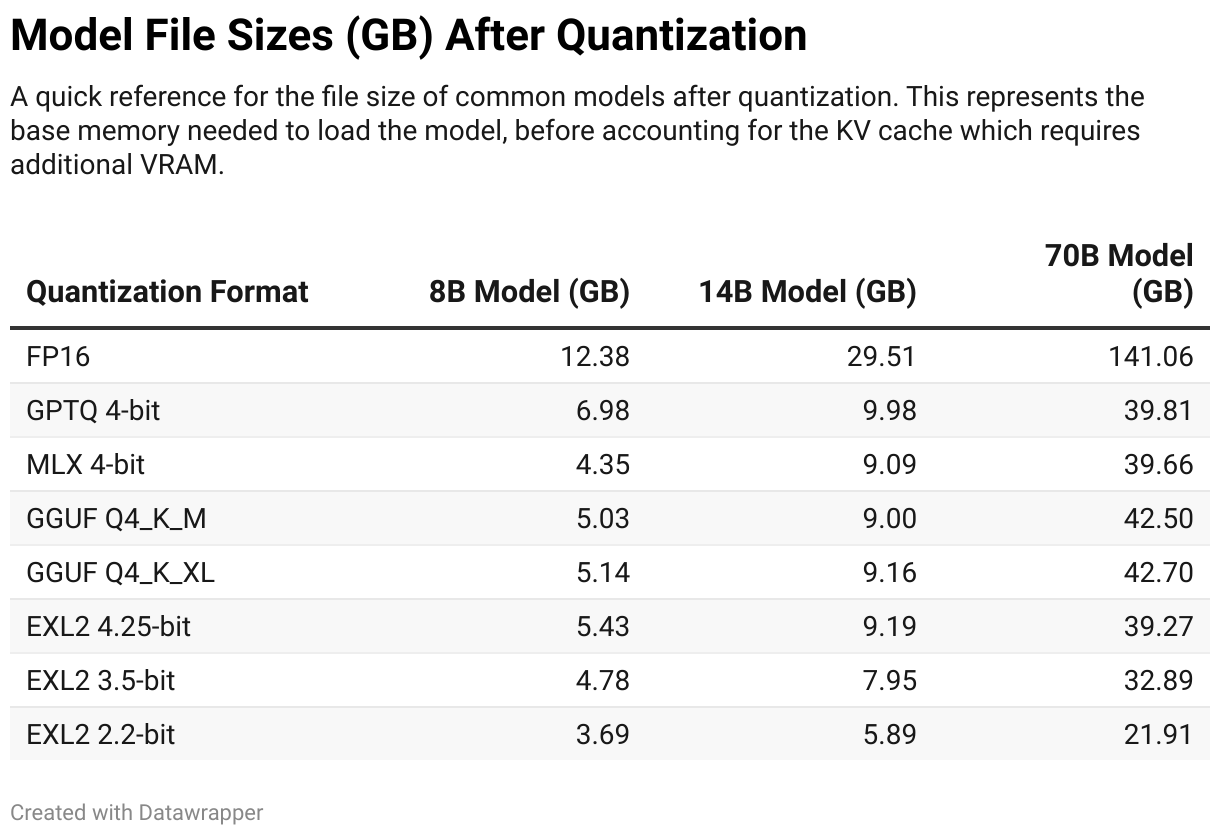
Add 2-4GB for context cache and inference overhead. Multi-GPU setups can split these requirements across cards.
Performance Considerations
Quantization affects both speed and accuracy. Understanding these trade-offs helps optimize your setup.
Memory Bandwidth Impact: Lower precision formats reduce memory bandwidth requirements, often improving inference speed even on fast hardware. This effect is most pronounced on memory-constrained systems.
Quality vs Size: More aggressive quantization saves memory but reduces model accuracy. Q4 formats generally provide good balance for most use cases. Q2 formats work for basic tasks but show noticeable quality degradation.
Hardware Optimization: Some formats work better with specific hardware. GPTQ and AWQ leverage CUDA optimizations effectively. GGUF CPU implementations are highly optimized for x86 processors.
Multi-GPU Configurations
Large models often require multiple GPUs. Different formats handle multi-GPU scenarios differently.
GGUF supports flexible GPU layer distribution. You can specify how many layers to load on each GPU, enabling creative configurations with mixed GPU types.
GPTQ and AWQ typically require similar GPUs for optimal performance but can work with mixed setups. The model splits across available VRAM automatically.
EXL2 works well in multi-GPU setups and allows fine-tuning memory distribution across cards.
Inference Software Compatibility
Different quantization formats require specific inference software:
- GGUF: llama.cpp, Ollama, LM Studio, text-generation-webui
- GPTQ: text-generation-webui, transformers library, AutoGPTQ
- AWQ: text-generation-webui, transformers library, vLLM
- EXL2/EXL3: ExLlamaV2, text-generation-webui
- BnB: transformers library, various training frameworks
Choose your format based on preferred inference software and ecosystem compatibility.
Quality Assessment
Quantized models trade accuracy for efficiency. Common quality metrics include perplexity scores and benchmark results, but practical testing with your specific use cases provides the best evaluation.
Test quantized models on tasks similar to your intended use. Creative writing, coding, and reasoning tasks may show different sensitivity to quantization. Start with Q4 formats and adjust based on observed quality.
Practical Tips for Running Quantized LLMs Locally
Start with pre-quantized models from Hugging Face repositories like Unsloth on Bartowski. This saves time and computational resources compared to quantizing models yourself.
Monitor VRAM usage during inference. Leave headroom for context cache growth during long conversations.
Consider storage requirements. Quantized models are smaller but you might want multiple quantization levels of the same model for different use cases.
Test different formats with the same base model to find the best balance for your specific hardware and use cases.
Conclusion
Quantization makes local LLM inference practical on consumer hardware. Choose formats based on your hardware capabilities, preferred software, and quality requirements. GGUF works well for mixed CPU/GPU systems, while GPTQ and AWQ excel on CUDA hardware with sufficient VRAM. EXL2 offers the most flexibility for fine-tuning the size-quality trade-off.
The key is matching quantization format to your specific hardware configuration and use case. Start conservative with Q4 formats and adjust based on performance and quality needs.