Dell Pro Slim Plus QBS1250
Specification and Upgrade Options
The Dell Pro Slim Plus QBS1250 is a pre-built business desktop computer first released in 2025. The motherboard is using the Q870 chipset and supports Intel Core Ultra Series 2 processor, and 128GB of DIMM DDR5-5600 memory.
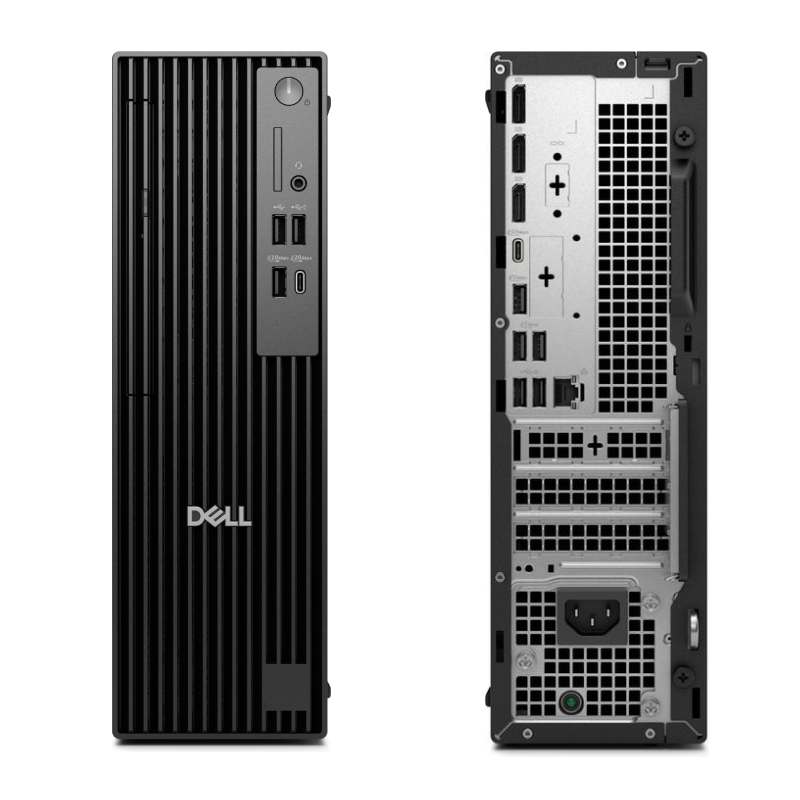
The Small Form Factor (SFF) is an in-between model. It has less space for the larger form factors (Mid tower, Mini tower, and Desktop), but it is still easily upgradable. Usually the SFF come with 2x PCIe slots, so fitting a low profile graphics card is possible.
Can you upgrade Dell Pro Slim Plus QBS1250 to play games?
Yes, you can upgrade Dell Pro Slim Plus QBS1250 for gaming with better processors, graphics card, memory, and storage devices. However, like many other business pre-built PCs, this model may have proprietary elements like the power supply, the chassis or the power connector, which can make it difficult for users to install aftermarket PSUs to support better GPUs. You can also find that there is space constrains inside the chassis, making it difficult to accommodete larger GPU to boost the gaming performance.
Does Dell Pro Slim Plus QBS1250 support Windows 11?
Yes, Dell Pro Slim Plus QBS1250 is compatible with Windows 11. According to Windows 11 specification, all models that have Intel 8th Gen processors (or newer) with TPM 2.0 support and a UEFI BIOS with Secure boot, are eligible to upgrade form Windows 10 to Windows 11 through Windows Update.
Processor
The Dell Pro Slim Plus QBS1250 supports Intel Core Ultra Series 2 processors on a Q870 chipset. Intel Core Ultra Series 2 CPUs (Arrow Lake) further advance Intel’s hybrid architecture with improved performance cores and efficiency cores. High-end models are capable of handling modern gaming, advanced emulation, virtualization-heavy homelabs, and demanding professional workloads without significant CPU constraints.
Best CPUs for Dell Pro Slim Plus QBS1250 upgrade:
| Model | Cores (Threads) | Base frequency | Turbo |
|---|---|---|---|
| Core Ultra 5 245K | 14(14) | 4.2 GHz | 5.2 GHz |
| Core Ultra 5 245KF | 14(14) | 4.2 GHz | 5.2 GHz |
| Core Ultra 7 265K | 20(20) | 3.9 GHz | 5.5 GHz |
| Core Ultra 7 265KF | 20(20) | 3.9 GHz | 5.5 GHz |
| Core Ultra 9 285K | 24(24) | 3.2 GHz | 5.7 GHz |
GPU upgrade
To upgrade the GPU of OptiPlex 7040 SFF, a low-power, low-profile graphics card must be used. Currently, the most reasonable GPU option is AMD's Radeon RX 6400 low profile. This model has a good price point, delivers decent FPS, and does not require any addtional hardware upgrades.
The low power requirements of this model make it the perfect option for an SFF gaming build. The RX 6400 low does not need any additional power from the PSU and can rely solely on the power delivered by the PCIe slot (75W).
GPU upgrade options for Dell Pro Slim Plus QBS1250 with the stock 360W power supply:
| GPU | Power consumption | Memory | Suggested PSU | Req. |
|---|---|---|---|---|
| RX 7400 Low profile | 55 W | 8 GB DDR6 | 180 W | Works with no additional hardware changes |
| RX 6400 Low profile | 50 W | 4 GB DDR6 | 180 W | Works with no additional hardware changes |
| GTX 1050 Ti Low profile | 75 W | 4 GB DDR5 | 180 W | Works with no additional hardware changes |
| GTX 1650 Low profile | 75 W | 4 GB DDR5 | 180 W | Works with no additional hardware changes |
| RTX A2000 Low profile | 70 W | 12 GB DDR6 | 180 W | Works with no additional hardware changes |
| RTX A4000 SFF | 70 W | 20 GB DDR6 | 180 W | Works with no additional hardware changes |
| RTX 3050 Low | 70 W | 6 GB DDR6 | 180 W | Works with no additional hardware changes |
Keep in mind that these low-profile, low-power GPUs can be quite noisy and may run hot when under full load.
Memory
Dell Pro Slim Plus QBS1250 supports up to 128 GB of DIMM DDR5-5600 RAM across four DIMM slots, with memory speeds up to 5600 MT/s and dual-channel support depending on the installed configuration.
Actual supported memory capacity and memory channels may vary depending on the installed CPU and chipset.
Typical Dell Pro Slim Plus QBS1250 memory configurations include 8 GB for everyday productivity and 16 GB for gaming, heavier multitasking, or professional workloads.
Wi-Fi Support
Dell Pro Slim Plus QBS1250 supports Wi-Fi and Bluetooth combo card with the on-board M.2 2230 (Wi-Fi/BT) slot. The card contains a Wi-Fi module that supports various Wi-Fi standards, as well as a Bluetooth module. It is small circuit board that is designed to fit into a dedicated slot on the motherboard.
Keep in mind that the card is not always included and you have to install one yourself.
Wi-Fi and Bluetooth wireless adapter upgrades for Dell Pro Slim Plus QBS1250:
| Model | Speed | Frequency | Interface |
|---|---|---|---|
| WiFi 6E (Gig+) Kit | 3000 Mbit/s | 2.4GHz / 5GHz | NGFF M.2 A/E Key |
| Rekong AX210 | 3000 Mbit/s | 2.4GHz / 5GHz | NGFF M.2 A/E Key |
| Gigabyte GC-Wbax200 | 2400 Mbit/s | 2.4GHz / 5GHz | PCIe |
| TP-Link Archer TX50E | 2400 Mbit/s | 2.4GHz / 5GHz | PCIe |
| TP-Link Archer T9UH | 1300 Mbit/s | 2.4GHz / 5GHz | USB 3.0 |
Ports
Dell Pro Slim Plus QBS1250 provides a fixed set of external I/O ports for connecting peripherals and displays. Port availability and versions determine supported data transfer speeds and display capabilities.
USB ports
Dell Pro Slim Plus QBS1250 includes ten USB ports in total in the following configuration - (4x) USB-A 2.0; (3x) USB-A 3.2 Gen 1; (1x) USB-A 3.2 Gen 2; (1x) USB-C 3.2 Gen 2; (1x) USB-C 3.2 Gen 2x2;The model include two USB 3.1 ports supporting up to 10 Gb/s transfer speeds.
Video ports
Dell Pro Slim Plus QBS1250 features three DisplayPort 1.4a outputs, suitable for modern digital displays.
No HDMI output is available on the motherboard.
Motherboard video outputs require a CPU with integrated graphics. Systems equipped with a dedicated GPU must use the video ports on the graphics card instead.
SSD storage - M.2 sockets and SATA ports
The Dell Pro Slim Plus QBS1250 comes with two SATA port(s) for connecting storage devices.
Dell Pro Slim Plus QBS1250 has also three M.2 socket(s) that supports PCIe NVMe (PCIe 4.0 x4) or SATA M.2 drives with speed of up to 8 GB/s. Currently this is one of the fastest commercially available versions of the PCIe bus (second to PCIe 5.0), making this configuration perefect for both gaming and work related tasks.
The M.2 PCIe SSD connector in combination with an NVMe drive allows for higher transfer rates, compared to the old SATA interface. In some situations, NVMe device connected to the M.2 PCIe socket can be more than 5 times faster.
*Keep in mind that some M.2 connectors may not support SATA SSDs. Check the motherboard manual to confirm compatibility.
Best PCIe NVMe drives for Dell Pro Slim Plus QBS1250 storage upgrade:
| Model | Form factor / Interface | NAND type | DRAM |
|---|---|---|---|
| Samsung 980 PRO SSD | M.2/x4 PCIe 4.0/NVMe | TLC | Yes |
| CORSAIR MP600 PRO | M.2/x4 PCIe 4.0/NVMe | TLC | Yes |
| SAMSUNG 970 EVO Plus | M.2/x4 PCIe 3.0/NVMe | TLC | Yes |
| Western Digital Black SN770 | M.2/x4 PCIe 4.0/NVMe | TLC | Yes |
| Kingston A2000 | M.2/x4 PCIe 3.0/NVMe | TLC | Yes |
Power Supply
The Dell Pro Slim Plus QBS1250 comes with a 360 Watt PSU. Having a power supply with high power rating is important, especially if you are doing upgrade with addtional components, like dedicated GPU and more HDDs. Will this 360 W be enough, it all depends on your specific use. Please keep in mind that some models might have more than one PSU option. Whenever possible get the most powerful one, as it might make future upgrades easier.
Motherboard