Dell OptiPlex Tower 7010 2023
Specification and Upgrade Options
The Dell OptiPlex Tower 7010 2023 is a pre-built business desktop computer first released in 2023. The motherboard is using the Q670 chipset and supports Gen13 Intel Core processor, and 64GB of DIMM DDR4-3200 memory.
If you are looking for a system with maximum upgradability, Dell OptiPlex Tower 7010 2023 is a good option. Models in this category usually have 4x PCIe slots, several drive bays and better cooling.
Can you upgrade Dell OptiPlex Tower 7010 2023 to play games?
Yes, you can upgrade Dell OptiPlex Tower 7010 2023 for gaming with better processors, graphics card, memory, and storage devices. However, like many other business pre-built PCs, this model may have proprietary elements like the power supply, the chassis or the power connector, which can make it difficult for users to install aftermarket PSUs to support better GPUs. You can also find that there is space constrains inside the chassis, making it difficult to accommodete larger GPU to boost the gaming performance.
Does Dell OptiPlex Tower 7010 2023 support Windows 11?
Yes, Dell OptiPlex Tower 7010 2023 is compatible with Windows 11. According to Windows 11 specification, all models that have Intel 8th Gen processors (or newer) with TPM 2.0 support and a UEFI BIOS with Secure boot, are eligible to upgrade form Windows 10 to Windows 11 through Windows Update.
Processor
The Dell OptiPlex Tower 7010 2023 supports Gen13 Intel Core technology on a Q670 chipset. 13th generation Intel Core CPUs (Raptor Lake) build upon Alder Lake with higher core counts and improved efficiency. High-end configurations are well-suited for advanced programming workloads, large virtualized environments, modern gaming, and high-end emulation without meaningful CPU bottlenecks.
Best CPUs for Dell OptiPlex Tower 7010 2023 upgrade:
| Model | Cores (Threads) | Base frequency | Turbo |
|---|---|---|---|
| Core i5 13500 | 6(12) | 2.5 GHz | 4.8 GHz |
| Core i5 13600 | 6(12) | 2.7 GHz | 5.0 GHz |
| Core i7 13700 | 8(16) | 2.1 GHz | 5.1 GHz |
| Core i7 13700F | 8(16) | 2.1 GHz | 5.1 GHz |
| Core i9 13900 | 8(16) | 2.0 GHz | 5.2 GHz |
| Core i9 13900F | 8(16) | 2.0 GHz | 5.2 GHz |
GPU upgrade
The Dell OptiPlex Tower 7010 2023 can safely support GPUs with suggested PSU of 300W, but more powerful cards require a PSU upgrade. With the stock PSU model, it supports up to an GeForce GTX 1650 Super
GPU upgrade options for Dell OptiPlex Tower 7010 2023 with the stock 300W power supply:
| GPU | Power consumption | Memory | Suggested PSU | Req. |
|---|---|---|---|---|
| NVIDIA RTX 4060 | 115 W | 8 GB DDR6 | 300 W | *Dual SATA to PCIe adapter |
| NVIDIA GTX 1650 Super | 100 W | 4 GB DDR6 | 290 W | *SATA to PCIe adapter |
| NVIDIA GTX 1060 | 118 W | 3 GB DDR5 | 290 W | *SATA to PCIe adapter |
| NVIDIA GTX 1660 | 120 W | 6 GB DDR5 | 290 W | *SATA to PCIe adapter |
| NVIDIA GTX 1060 | 125 W | 6 GB DDR5 | 290 W | *SATA to PCIe adapter |
| NVIDIA GTX 1660 Super | 130 W | 6 GB DDR6 | 290 W | *SATA to PCIe adapter |
| NVIDIA GTX 1660 Ti | 125 W | 6 GB DDR6 | 290 W | *SATA to PCIe adapter |
| NVIDIA RTX 3050 | 130 W | 8 GB DDR6 | 290 W | *Dual SATA to PCIe adapter |
| AMD RX 6600 | 132 W | 8 GB DDR6 | 290 W | *Dual SATA to PCIe adapter |
| NVIDIA RTX 5060 | 145 W | 8 GB GDDR7 | 290 W | *Dual SATA to PCIe adapter |
| NVIDIA GTX 1050 Ti | 75 W | 4 GB DDR5 | 250 W | Works with no additional hardware changes |
| NVIDIA GTX 1650 | 75 W | 4 GB DDR5 | 250 W | Works with no additional hardware changes |
| NVIDIA A2000 Low | 70 W | 6 GB DDR6 12 GB DDR6 |
250 W | Works with no additional hardware changes |
| AMD RX 460 | 75 W | 4 GB DDR5 | 250 W | *SATA to PCIe adapter |
| AMD RX 6400 | 50 W | 4 GB DDR6 | 200 W | Works with no additional hardware changes |
GPU compatibility in the Dell OptiPlex Tower 7010 2023 depends on several hardware constraints. The physical space available inside the chassis determines the maximum GPU length, height, and thickness that can be installed. In addition, the installed power supply unit (PSU) must provide sufficient wattage and the required PCIe power connectors for the selected graphics card.
Before you begin shopping for a new GPU, it is important to check the power supply unit (PSU) currently installed. This is because the Dell OptiPlex Tower 7010 2023 is often sold with different PSU wattages depending on the original configuration.
Memory
Dell OptiPlex Tower 7010 2023 supports up to 64 GB of DIMM DDR4-3200 RAM across two DIMM slots, with memory speeds up to 3200 MT/s and dual-channel support depending on the installed configuration.
Actual supported memory capacity and memory channels may vary depending on the installed CPU and chipset.
Typical Dell OptiPlex Tower 7010 2023 memory configurations include 8 GB for everyday productivity and 16 GB for gaming, heavier multitasking, or professional workloads.
Wi-Fi Support
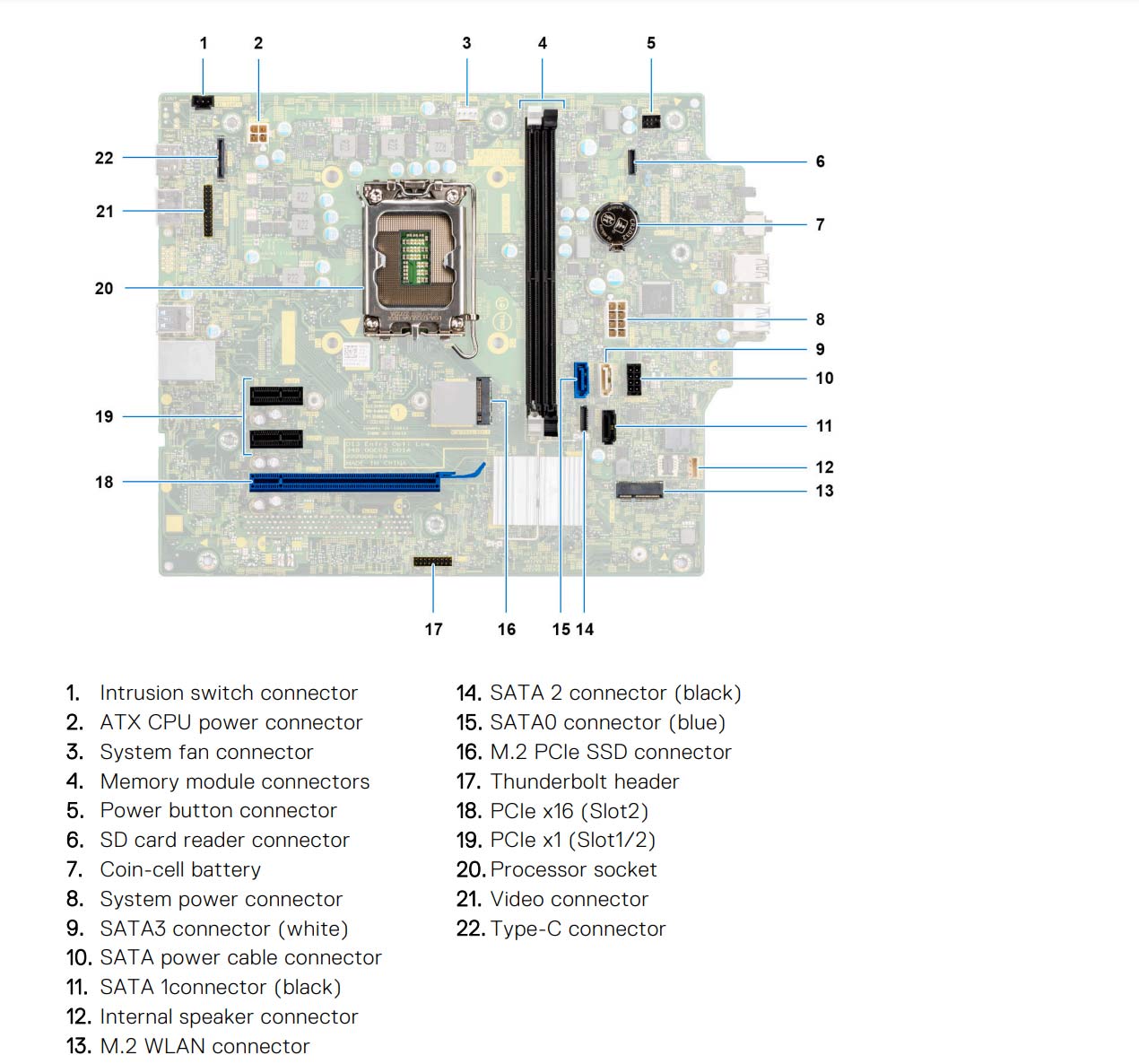
Dell OptiPlex Tower 7010 2023 supports Wi-Fi and Bluetooth combo card with the on-board M.2 2230 (Wi-Fi/BT) slot. The card contains a Wi-Fi module that supports various Wi-Fi standards, as well as a Bluetooth module. It is small circuit board that is designed to fit into a dedicated slot on the motherboard.
Keep in mind that the card is not always included and you have to install one yourself.
Wi-Fi and Bluetooth wireless adapter upgrades for Dell OptiPlex Tower 7010 2023:
| Model | Speed | Frequency | Interface |
|---|---|---|---|
| WiFi 6E (Gig+) Kit | 3000 Mbit/s | 2.4GHz / 5GHz | NGFF M.2 A/E Key |
| Rekong AX210 | 3000 Mbit/s | 2.4GHz / 5GHz | NGFF M.2 A/E Key |
| Gigabyte GC-Wbax200 | 2400 Mbit/s | 2.4GHz / 5GHz | PCIe |
| TP-Link Archer TX50E | 2400 Mbit/s | 2.4GHz / 5GHz | PCIe |
| TP-Link Archer T9UH | 1300 Mbit/s | 2.4GHz / 5GHz | USB 3.0 |
Ports
Dell OptiPlex Tower 7010 2023 provides a fixed set of external I/O ports for connecting peripherals and displays. Port availability and versions determine supported data transfer speeds and display capabilities.
USB ports
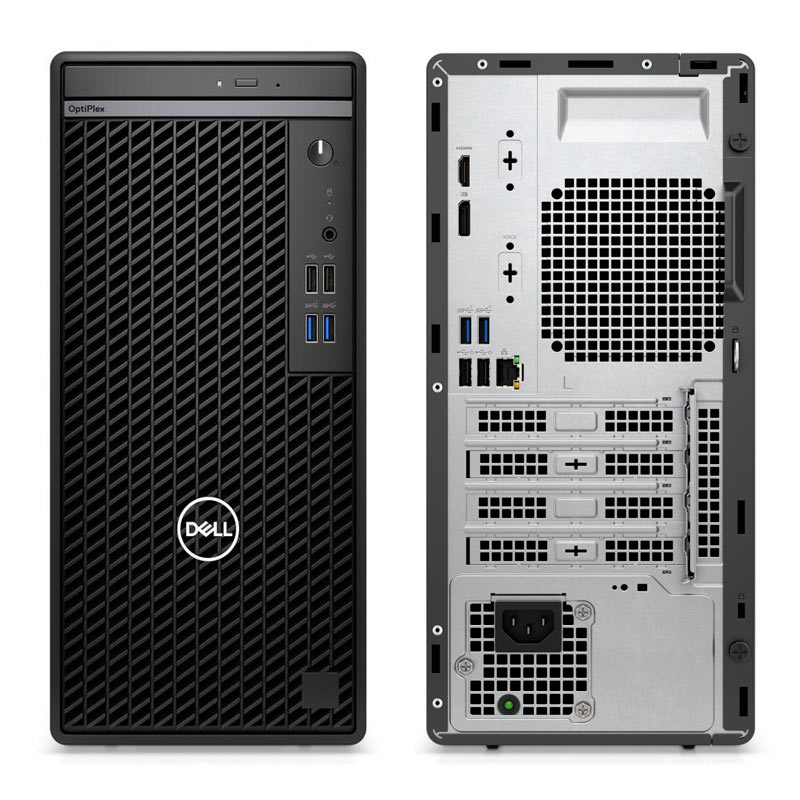
Dell OptiPlex Tower 7010 2023 includes eight USB ports in total in the following configuration - (4x) USB-A 2.0; (4x) USB-A 3.0; with no USB 3.1 ports available.
Video ports
Dell OptiPlex Tower 7010 2023 features one DisplayPort 1.4a output, suitable for modern digital displays.
HDMI output is provided via two HDMI 1.4a ports.
Motherboard video outputs require a CPU with integrated graphics. Systems equipped with a dedicated GPU must use the video ports on the graphics card instead.
SSD storage - M.2 sockets and SATA ports
The Dell OptiPlex Tower 7010 2023 comes with three SATA port(s) for connecting storage devices.
Dell OptiPlex Tower 7010 2023 has also one M.2 socket(s) that supports PCIe NVMe (PCIe 4.0 x4) or SATA M.2 drives with speed of up to 8 GB/s. Currently this is one of the fastest commercially available versions of the PCIe bus (second to PCIe 5.0), making this configuration perefect for both gaming and work related tasks.
The M.2 PCIe SSD connector in combination with an NVMe drive allows for higher transfer rates, compared to the old SATA interface. In some situations, NVMe device connected to the M.2 PCIe socket can be more than 5 times faster.
*Keep in mind that some M.2 connectors may not support SATA SSDs. Check the motherboard manual to confirm compatibility.
Best PCIe NVMe drives for Dell OptiPlex Tower 7010 2023 storage upgrade:
| Model | Form factor / Interface | NAND type | DRAM |
|---|---|---|---|
| Samsung 980 PRO SSD | M.2/x4 PCIe 4.0/NVMe | TLC | Yes |
| CORSAIR MP600 PRO | M.2/x4 PCIe 4.0/NVMe | TLC | Yes |
| SAMSUNG 970 EVO Plus | M.2/x4 PCIe 3.0/NVMe | TLC | Yes |
| Western Digital Black SN770 | M.2/x4 PCIe 4.0/NVMe | TLC | Yes |
| Kingston A2000 | M.2/x4 PCIe 3.0/NVMe | TLC | Yes |
Power Supply
The Dell OptiPlex Tower 7010 2023 comes with a 300 Watt PSU. Having a power supply with high power rating is important, especially if you are doing upgrade with addtional components, like dedicated GPU and more HDDs. Will this 300 W be enough, it all depends on your specific use. Please keep in mind that some models might have more than one PSU option. Whenever possible get the most powerful one, as it might make future upgrades easier.
Motherboard